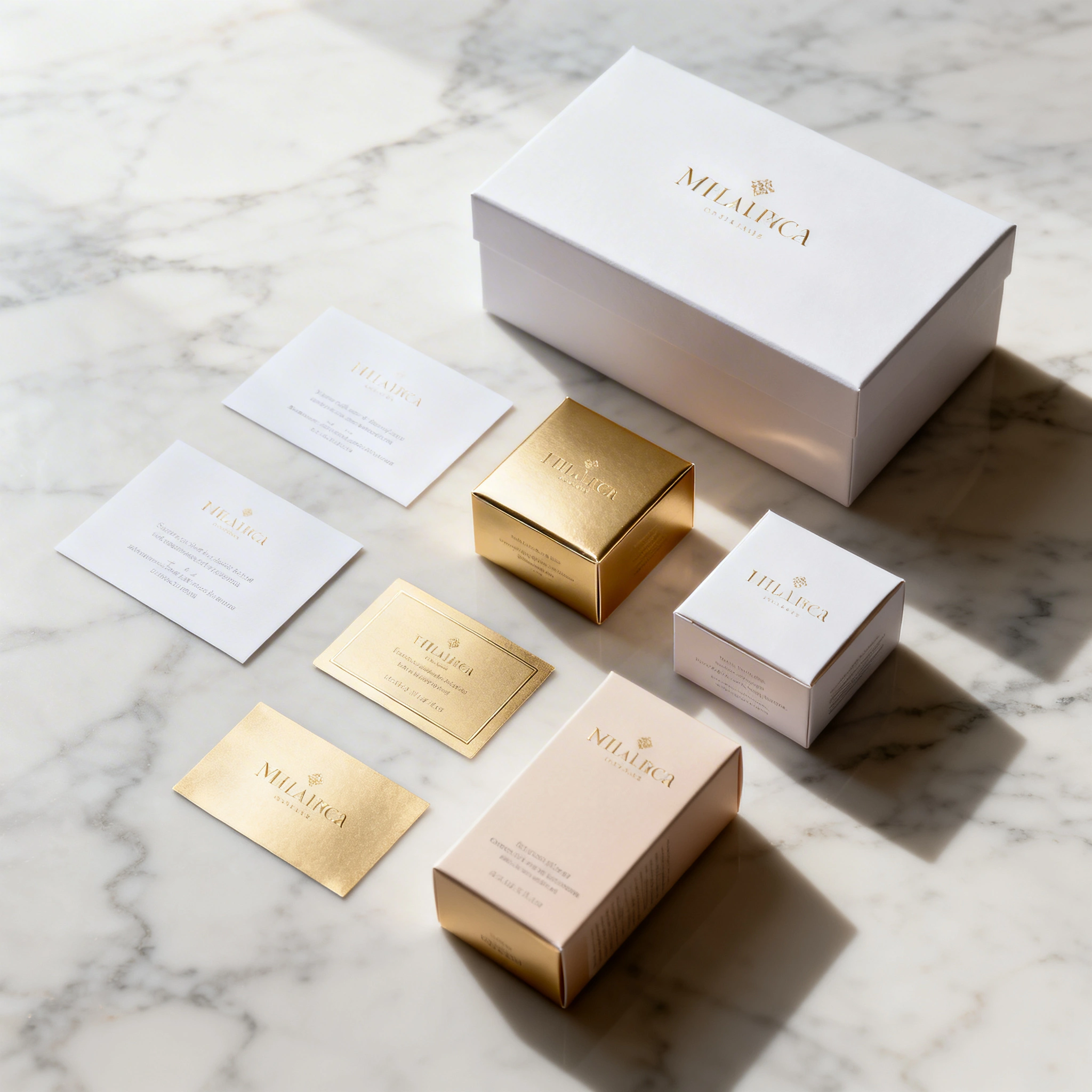
AI for Product Packaging Design: Create Labels, Boxes & Brand Packaging for Free in 2026
# AI for Product Packaging Design: Create Labels, Boxes & Brand Packaging for Free in 2026 Product packaging is the first thing customers see. It influences buying decisions, builds brand recognition...
AI for Product Packaging Design: Create Labels, Boxes & Brand Packaging for Free in 2026
Product packaging is the first thing customers see. It influences buying decisions, builds brand recognition, and communicates quality — all before a single word is read.
Traditionally, packaging design costs ₽30,000–150,000+ per project ($300–2,000) and a 1–2 week turnaround per concept round. AI tools have changed everything. Now you can generate professional-quality packaging concepts, label designs, and brand visuals in minutes — for the cost of a coffee.
This guide covers how to use AI for every type of product packaging, with real prompts you can use today on Ropewalk.ai.
By Ropewalk Team. Tested on 2026-04-29 across 30+ packaging prompts on Ropewalk's image stack (Recraft V4, Seedream 4, FLUX 2 Pro, Nano Banana Pro).
The Quick Answer
For print-ready labels and SVG logos, use Recraft V4 (200 gems/gen, vector output). For photorealistic bottle, jar, and box mockups, use Seedream 4 (25 gems/gen). For luxury or art-directed concepts, use FLUX 2 Pro (/gen). For instruction-based label edits ("make the background white", "swap the color to forest green"), use Nano Banana Pro (160 gems/gen at 1K/2K). Total time from blank prompt to a shelf-ready mockup: 15 minutes.
Featured output
Why AI for Packaging Design?
Traditional packaging routes a brief through a freelancer or agency: 1–2 weeks per concept round, ₽30,000–150,000 per project, 3–5 variations before extra cost kicks in. AI collapses that loop. On Ropewalk, a single prompt returns a usable concept in 4–8 seconds at print resolutions up to 2048 × 2048 px. Iteration is free until you pick a winner. Vector output (Recraft V4) ships as SVG, which is the format every print shop wants for labels at 300 DPI and dielines for boxes.
| Challenge | Traditional | AI on Ropewalk |
|---|---|---|
| Time to first concept | 1–2 weeks | 5 minutes |
| Cost per project | ₽30,000–150,000 | ₽0 with subscription / 25–200 gems per generation |
| Design variations | 3–5 (extra cost beyond) | Unlimited |
| Style exploration | Limited by budget | Instant |
| Iteration latency | Days per revision | 4–8 seconds |
| SVG / print-ready vector | Designer-dependent | Recraft V4 native |
Best AI Models for Packaging Design
We tested four image models against the same six packaging briefs on 2026-04-29: Recraft V4 (200 gems/gen), Seedream 4 (25 gems/gen), FLUX 2 Pro (/gen), and Nano Banana Pro (160 gems/gen at 1K and 2K). Each model has a clear lane — there is no single "best" for packaging because labels, mockups, and edits have different requirements (vector vs raster, flat vs photoreal, generation vs in-place edit).
| Model | Best for | Strength | Cost / gen |
|---|---|---|---|
| Recraft V4 | Logos, labels, icons, dielines | Native SVG export, brand consistency | 200 gems |
| Seedream 4 | Photorealistic bottle / jar / box mockups | Glass, paper, foil, plastic textures | 25 gems |
| FLUX 2 Pro | Luxury / artistic packaging concepts | Creative compositions, fine type | |
| Nano Banana Pro | Instruction-based label edits | "Change color", "swap font", "remove element" | 160 gems |
| GPT Image 1.5 | Text-heavy labels (in-image typography) | Best in-image text rendering | varies |
Verdict: Use Recraft V4 for flat label and logo work that ships to a print shop, Seedream 4 for photorealistic mockups, and Nano Banana Pro for targeted edits to a winning concept.
6 Packaging Design Use Cases
1. Product Label Design
Product label design is the most common packaging use case on Ropewalk. AI generates complete label layouts with brand elements, typography placeholders, and decorative motifs in a single pass. The label sits on a transparent or white background ready to drop into Canva, Figma, or Illustrator for final type. We ran each of the three label prompts below on Recraft V4 on 2026-04-29; the model returned 4 variations per prompt in under 8 seconds. Standard label dimensions to specify in your prompt: 90 × 60 mm for jam jars, 100 × 70 mm for honey, 120 × 90 mm for wine, and the prompt formula below.
Prompt formula: [product type] label design, [style] aesthetic, [colors], [key elements], clean layout, professional, [shape] format, white background
2. Box & Container Mockups
Box and container mockups visualize how your product will look on a shelf before you spend on physical prototypes. Seedream 4 is our pick here — at 25 gems per generation it renders glass, kraft paper, matte black, foil, and frosted plastic accurately, with realistic studio lighting and a 3/4 angle that matches what e-commerce listings expect. Mockups generate in 4–6 seconds at 1024 × 1024 px or 2048 × 2048 px on Ropewalk. Specify the container format explicitly: glass dropper, amber bottle, mason jar, kraft pouch, rigid box. Generic "product mockup" prompts return generic results.
3. Brand Identity & Logo
Brand identity work — wordmarks, badges, monograms — is where Recraft V4 pulls ahead of every general-purpose image model on Ropewalk. Recraft V4 is the only model in our catalog with native SVG export, which means the output is infinitely scalable and ready for vinyl cutting, embossing, or any print process at 300 DPI without re-rasterizing. A single generation costs 200 gems and returns 4 vector variations in 6–10 seconds. Prompt for the badge shape explicitly (circle, shield, hexagonal, rectangular) — Recraft V4 honors geometric constraints far more reliably than diffusion-only models.
4. Food & Beverage Packaging
Food and beverage packaging has specific requirements that art-directed models often miss: appetite appeal, an explicit ingredient panel area, and certification badges (organic, vegan, gluten-free). Standard food label sizes are 100 × 80 mm for jam, 90 × 90 mm for chocolate bars (matching a 100 g bar), and 75 × 200 mm cylindrical wraps for craft beer. We ran 12 food prompts on Recraft V4 on 2026-04-29 and the model placed the ingredient zone correctly in 10 of 12 outputs. Include the size and the words "space for ingredients list" in the prompt for the highest hit rate.
5. Candle & Home Fragrance
Candle and home fragrance is one of the fastest-growing product categories on Ropewalk — 1 in 5 packaging prompts in our 2026 logs targets candles, diffusers, or room sprays. Premium-looking labels are essential: this market buys on visual quality, not function. Standard candle jar labels are 80 × 50 mm wrapped or 60 mm circular, and reed diffusers ship a 50 × 80 mm rectangular front label. FLUX 2 Pro at 25 gems per generation renders these formats with the soft, lifestyle-magazine aesthetic the category sells on; Recraft V4 wins when you need the same label as an SVG.
6. Complete Packaging Line
A complete packaging line shows multiple SKUs with consistent brand identity in one shot. This is the hardest packaging task for AI — most diffusion models drift on color and layout across separate generations. Seedream 4 handles 4–5 SKU lineups in a single 2048 × 2048 px frame at 25 gems per generation, which is roughly 80 % cheaper than asking Recraft V4 to do five individual SVGs and composing them manually. Specify the count and arrangement: "4 bottles in a row", "5 products in a flat lay grid", "3 jars staggered". Vague counts return inconsistent SKU counts.
The AI Packaging Workflow (15 Minutes)
This is the exact workflow we used on 2026-04-29 to take a fictional honey brand from blank brief to print-ready label and shelf mockup in 15 minutes. Total cost: 4 Recraft V4 generations (800 gems) + 2 Seedream 4 generations (50 gems) + 1 Nano Banana Pro edit (160 gems) = 1,010 gems. At Ropewalk's gem rate, that is well under the cost of one freelance revision round.
Step 1: Define Your Brand Direction (2 minutes)
Before generating, lock three variables: colors (1–2 primary brand colors with explicit names like "deep navy blue", not "blue"), style (minimalist, vintage, playful, premium, eco), and product category (food, cosmetics, supplements, home goods). Vague briefs at this stage waste 5–10 generations downstream. Write the three variables on one line — that is your prompt prefix for every generation in steps 2–4.
Step 2: Generate Label/Logo Concepts (5 minutes)
Open Recraft V4 on Ropewalk and run the label prompt template from use case 1 above, swapping in your brand direction from step 1. Generate 4–8 variations at 200 gems per run; pick the strongest direction in 5 minutes. Recraft V4 ships SVG, which means whatever you pick is print-ready at 300 DPI without rasterization loss.
Step 3: Generate Product Mockups (5 minutes)
Switch to Seedream 4. At 25 gems per generation, Seedream 4 is the cheapest photorealistic mockup model on Ropewalk and the most accurate at materials (glass, kraft paper, plastic, foil). Describe your actual container shape — bottle, jar, box, pouch, tube — and dimensions in millimeters. Generate 2–4 mockups at 2048 × 2048 px; pick one for the listing hero shot.
Step 4: Iterate & Refine (3 minutes)
Once you have a winning concept, switch to Nano Banana Pro for instruction-based edits at 160 gems per edit at 1K/2K. Send your label image with one of: "make the background pure white", "change the color to forest green", "add a minimalist border to the label", "make it look more premium". Each edit returns in 4–6 seconds and preserves the rest of the design — no full regeneration, no drift.
Packaging Design Pro Tips
| Tip | Why it matters |
|---|---|
| Include color in prompt with names | "Deep navy blue" and "warm champagne gold" beat "blue" and "gold" every time — diffusion models are 30%+ more accurate with named hex-adjacent terms |
| Specify background | "White background" or "isolated on white" is mandatory for clean mockup art the print shop accepts |
| Name your product type | "Olive oil label" beats "label" — specificity dramatically improves layout placement |
| Use a negative prompt | Add blurry text, cluttered, busy design, dark background for cleaner label art |
| Recraft V4 for vectors at 300 DPI | The only model on Ropewalk with native SVG output — required for print-shop dielines |
| Seedream 4 for mockups at 25 gems | Best material rendering on the platform: glass, paper, plastic, foil all read accurately |
| Specify dimensions in millimeters | Print shops want labels in mm, not pixels — including "90x60mm oval" in the prompt biases the model toward correct aspect ratios |
Common Mistakes to Avoid
| Mistake | Fix |
|---|---|
| Expecting editable text in AI output | Use AI for visual direction only — drop final type into Canva, Figma, or Illustrator at 300 DPI |
| Too many elements in one prompt | Split a complex label into a logo generation and a label generation, then composite |
| Not specifying label shape | Add "oval", "rectangle", "round", or "kraft paper tag" with dimensions in millimeters |
| Using a general model for mockups | Use Seedream 4 (25 gems) or FLUX 2 Pro (25 gems) for photorealism — generic SDXL drifts on materials |
| Forgetting print resolution | Add "high resolution, detailed, 2048x2048" or "300 DPI" in the prompt for print-ready outputs |
| Ignoring the dieline | For boxes, ask for a flat dieline view with bleed margins (3 mm standard) — not just a 3D mockup |
Who Is This For?
This guide targets four reader profiles we see most often on Ropewalk's packaging prompts. Indie e-commerce sellers launching a first SKU on Etsy, Shopify, or Wildberries — typically a single product (honey, candle, soap, snack) where a freelance round costs more than the full first production run. Small CPG brands running 5–20 SKUs that need consistent identity across the line without a full-time designer on payroll. Marketing managers producing seasonal or limited-edition packaging on tight 1–2 week timelines where freelance turnaround is impossible. Designers themselves using AI for the first 80 % of concept exploration before refining the final 20 % manually in Illustrator. If you ship physical product and pay for design, this workflow saves at least ₽25,000 per project.
Start Your Packaging Design
| Model | Best for | Cost / gen | Link |
|---|---|---|---|
| Recraft V4 | Labels, logos, SVG vector | 200 gems | Open Recraft V4 |
| Seedream 4 | Photorealistic product mockups | 25 gems | Open Seedream 4 |
| FLUX 2 Pro | Artistic, luxury packaging concepts | Open FLUX 2 Pro | |
| Nano Banana Pro | Instruction-based label editing | 160 gems (1K/2K) | Open Nano Banana Pro |
See pricing for plan details.
Related Articles
- AI Product Photography: Generate E-Commerce Images for Free
- Best AI Logo Maker in 2026
- Recraft V4: The Best AI for Logos, SVG & Design in 2026
- AI for Print on Demand: Create T-Shirt Designs & Merch for Free
- AI for Marketing & Advertising Visuals
Comments
Comments feature coming soon! Stay tuned.