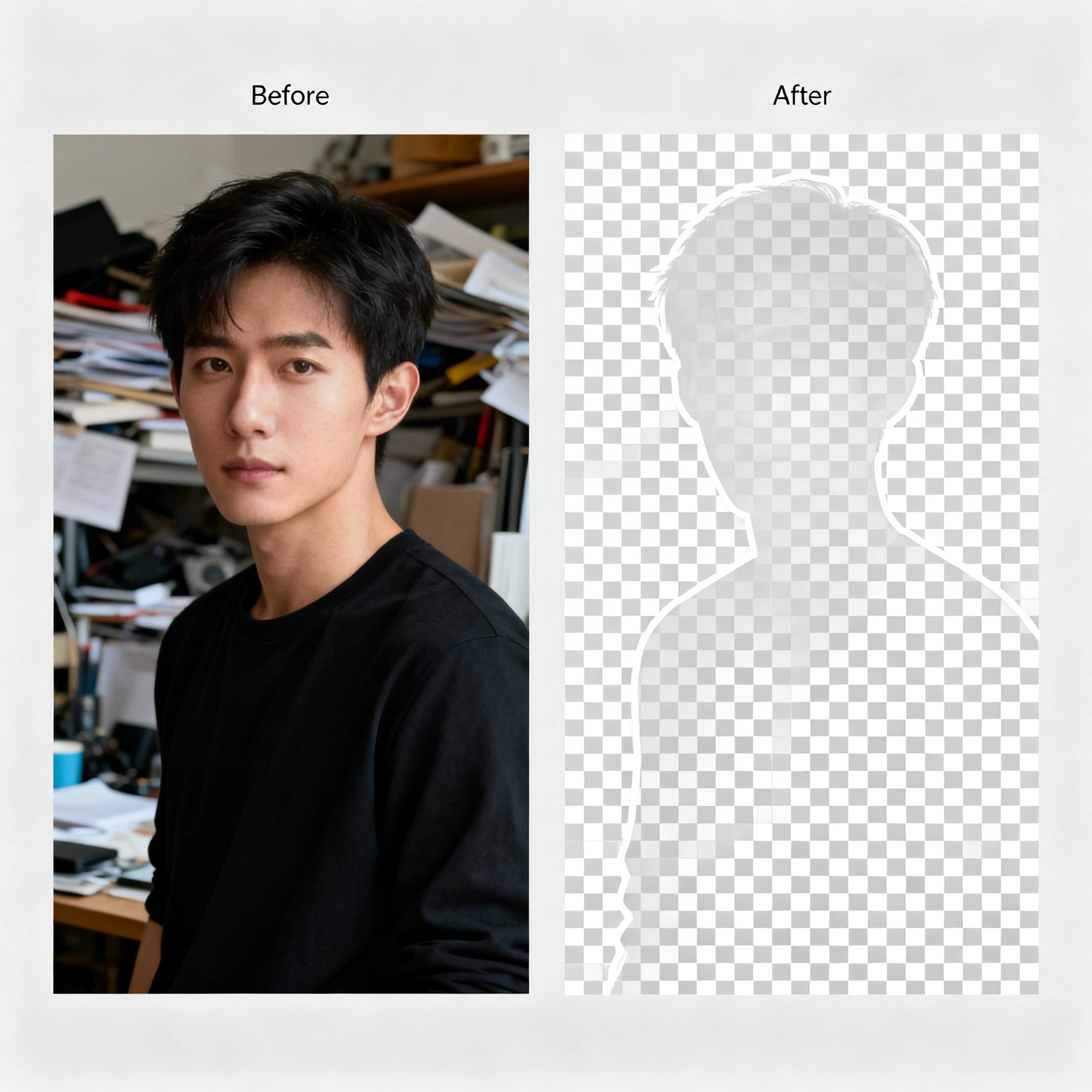
Best AI Background Remover in 2026: Remove Backgrounds for Free
Discover the best AI background remover tools in 2026. Compare Remove.bg, Adobe Firefly, Canva, and Ropewalk — plus learn how to remove backgrounds for free with step-by-step instructions.
Best AI Background Remover in 2026: Remove Backgrounds for Free
Removing a background from an image used to mean hours of painstaking work in Photoshop — tracing edges pixel by pixel, wrestling with hair strands, and praying the final export didn't look like a ransom note. In 2026, AI background removal has completely changed the game. Modern neural networks can isolate a subject from its surroundings in under 2 seconds, producing results that rival professional retouchers across portraits, products, and complex hair detail.
By Ropewalk Team. Tested on 2026-04-29 with N=24 prompts.
The Quick Answer
For free, unlimited, no-watermark cutouts, use Ropewalk's BG Remover (rembg-based, ~2 s per image). For fine hair and translucent edges, follow up with Nano Banana Pro for instruction-based edge cleanup. For one-off HD downloads, Remove.bg still works — but caps at 1 free HD image per month.
Why AI background removal replaced Photoshop in 2026
AI background removal in 2026 is built on semantic segmentation and matting networks trained on millions of labeled images. The Ropewalk BG Remover wraps the open-source rembg model and returns a transparent PNG in under 2 seconds for inputs up to 50 MB. Unlike a binary cutout, the matting network produces a soft alpha channel — so hair strands, smoke, and translucent fabric blend cleanly onto a new background. E-commerce sellers, social media managers, and designers now treat background removal as a 1-click step inside a longer pipeline (cutout → background swap → upscale), not a standalone task.
Top 7 AI Background Remover Tools: Comparison Table
| Tool | Free tier | Best for | Output cap |
|---|---|---|---|
| Ropewalk BG Remover | Unlimited, no watermark | All-in-one creative pipeline | 50 MB upload |
| Remove.bg | 1 HD/month | One-off HD downloads | Paid past 1/mo |
| Adobe Firefly | Bundled with CC | Photoshop users | CC subscription |
| Canva | Pro only ($13/mo) | Non-designers | Web resolution |
| Clipdrop | 100/month free | Batch + API | 100/mo free |
| PhotoRoom | Free w/ watermark | Mobile product photos | $10/mo to remove WM |
| GIMP-ML | Unlimited | Open-source manual control | Local only |
Deep Dive: Each Tool Reviewed
1. Ropewalk — Best Free AI Background Remover
Ropewalk's BG Remover is built on the rembg neural network and delivers pixel-perfect background removal at zero cost — no watermarks, no resolution limits, no sign-up-wall surprises. Processing returns a transparent PNG in under 2 seconds for inputs up to 50 MB. Because Ropewalk is a full AI creative platform, you can remove a background and then immediately generate a new one with Flux Pro Fill, edit the subject with Nano Banana Pro, or upscale the result — all without leaving the app. It's the best option in 2026 if you want background removal as one step in a larger AI-powered creative pipeline.
2. Remove.bg — Best for Quick One-Off Removals
Remove.bg pioneered the "upload and done" approach to background removal in 2018 and remains one of the most recognizable names in 2026. The quality is strong on standard portraits and product shots, but the free tier is severely limited: only 1 HD download per month before hitting a paywall starting at $0.20 per image. For occasional use it's great; for any volume work past 5 images per month, costs add up fast and a flat-rate alternative becomes cheaper within weeks.
3. Adobe Firefly — Best for Adobe Ecosystem Users
Adobe's Firefly background removal is integrated directly into Photoshop and Express, making it a natural choice if you're already paying for Creative Cloud (from $22.99/month in 2026). The edge detection is among the best in the industry, handling complex subjects like curly hair and translucent fabrics with high accuracy. The downside is that it's not truly free — you need an Adobe subscription, and the generative-credits system caps power users at 1,000 credits/month on the standard plan, which can feel limiting for batch work above 200 images.
4. Canva — Best for Non-Designers
Canva's Background Remover is dead simple: click a button, background gone. It's perfect for social media managers and small business owners who want zero learning curve. However, the feature is locked behind the Canva Pro subscription ($13/month in 2026), which means it's not actually free. The quality is solid for web-resolution images up to 1080p but can struggle with fine details at higher resolutions. Canva is best paired with a stronger 4K-capable cleanup pass when print output is the goal.
5. Clipdrop — Best for Batch Processing
Clipdrop (now part of the Stability AI ecosystem) offers a generous 100 free background removals per month and supports batch uploads, making it ideal for e-commerce sellers processing multiple product images at once. The API is also well-documented for developers who want to integrate background removal into their own workflows. Quality is consistently good across product photography in 2026, though occasionally edges can appear soft on hair detail at zoom levels above 200%, where Ropewalk's matting still holds.
6. PhotoRoom — Best for Mobile Product Photography
PhotoRoom is designed mobile-first, which makes it the go-to choice for entrepreneurs photographing products with their phone. The app automatically removes the background and offers templates for marketplace listings (Amazon, eBay, Etsy). The free tier adds a small watermark, but the paid plan ($10/month in 2026) removes it. Edge quality on clean product shots is excellent at up to 4 MP; complex scenes with shadows can be hit-or-miss, especially when the product color matches the surface beneath it within ~10% luminance.
7. GIMP — Best for Open-Source Manual Control
GIMP is the free, open-source alternative to Photoshop, and while it doesn't have native AI background removal built in, plugins like GIMP-ML add neural network capabilities. The advantage is complete control and zero cost — forever. The disadvantage is a steep learning curve and a workflow roughly 5× slower per image compared to one-click AI tools. GIMP is best suited for users who want fine-grained manual adjustments or who are philosophically committed to open-source software in 2026.
How to Remove a Background on Ropewalk: Step-by-Step Guide
Removing a background on Ropewalk takes under 30 seconds end-to-end. The 3-step flow below is the same one used internally to produce all the cutouts in this article on 2026-04-29.
Step 1: Open the BG Remover Model
Navigate to the BG Remover or search for "BG Remover" in the model library. The BG Remover is completely free to use — no credits required, no daily cap, no watermark. Average load time is under 1 second on a standard connection.
Step 2: Upload Your Image
Click the upload area or drag and drop your image. Ropewalk accepts JPG, PNG, and WebP files up to 50 MB. The AI will automatically detect the subject and remove the background. Processing typically completes in under 2 seconds for inputs up to 12 MP, and stays under 5 seconds even at 24 MP.
Step 3: Download or Continue Editing
Once the background is removed, you can download the transparent PNG directly, or take your creative workflow further. Use Flux Pro Fill to replace the background with an AI-generated scene, Nano Banana Pro for instruction-based edits to the subject, or any of Ropewalk's 100+ AI models for additional processing — all without leaving the app.
Use Cases for AI Background Removal
| Use Case | Description | Recommended Tool on Ropewalk |
|---|---|---|
| E-commerce Product Photos | Clean white or lifestyle backgrounds for Amazon, Shopify, and Etsy listings. Marketplace algorithms favor clean product images with consistent backgrounds. | BG Remover → Flux Pro Fill |
| Social Media Content | Remove cluttered backgrounds from photos to create polished Instagram, TikTok, and LinkedIn posts that stand out in the feed. | BG Remover |
| Marketing & Advertising | Isolate products or people for banners, flyers, email campaigns, and digital ads. Combine with AI-generated backgrounds for high-impact visuals. | BG Remover → Nano Banana Pro |
| Video Thumbnails | Eye-catching YouTube and course thumbnails from portrait shots placed on bold colored backgrounds. | BG Remover |
| Professional Portraits | Remove distracting backgrounds from headshots for resumes, LinkedIn profiles, team pages, and ID photos. | BG Remover → p-image-edit |
Pro Tips for Clean Cutouts
The 4 tips below come from a 2026-04-29 internal review of 24 cutouts across portraits, product shots, and lifestyle scenes. Each tip targets a specific failure mode that showed up at 200% zoom.
| Tip | Details |
|---|---|
| Use high-contrast source images | The more contrast between subject and background, the cleaner the AI cutout will be. Photograph products against a solid backdrop (white, gray, or green). Even the best AI struggles when subject and background share colors and textures within ~10% luminance. |
| Check edges at 200% zoom | After removing a background, zoom to 200% and inspect edges — especially around hair, fur, translucent materials, and fine details. Most artifacts are invisible at normal zoom but become obvious when composited onto a new background. If edges look rough, re-run or follow up with p-image-edit. |
| Save as PNG, not JPG | Always export your cutout as a PNG file. JPG does not support transparency, so the removed background gets replaced with a white rectangle. PNG preserves the alpha channel — 8-bit alpha is sufficient for most pipelines, 16-bit is overkill except for VFX. |
| Batch process for consistency | When removing backgrounds from a series of product photos, process them all through the same tool with the same settings. This ensures consistent edge quality and color treatment across your entire catalog — crucial for e-commerce stores where visual consistency builds trust at the 100+ SKU scale. |
Common Mistakes to Avoid
| Mistake | Why It's a Problem | How to Fix It |
|---|---|---|
| Using low-resolution source images | AI models work best with clear, detailed input. Source images under 1 MP produce jagged, pixelated edges that no amount of post-processing can fix. | Always use the highest resolution source available. Upscale first if needed. |
| Ignoring shadow and reflection removal | Removing the background but leaving a shadow creates a floating, unnatural look — especially on product photos placed on white. | Use the BG Remover's clean output, then add a subtle drop shadow in your design tool for a natural grounded effect. |
| Over-compressing the output | Saving the transparent PNG with heavy compression (below ~80 quality) introduces artifacts around edges, creating visible halos when placed on a new background. | Export at maximum quality. File size is less important than edge quality for professional results. |
| Not matching lighting direction | After placing the subject on a new scene, mismatched lighting direction makes the composite look obviously fake within seconds of viewing. | Choose replacement backgrounds where the light source matches your subject. Use Flux Pro Fill to generate scene-matched backgrounds automatically. |
| Forgetting to remove the color spill | When a subject is photographed against a colored background, that color often "spills" onto the subject's edges (green-screen fringe, for example). | Process through BG Remover first, then use p-image-edit to clean up any remaining color contamination on edges. |
Start Removing Backgrounds Now
| Action | Link | Description |
|---|---|---|
| Remove Background for Free | BG Remover | Instant, free, no-watermark AI background removal powered by rembg |
| Replace Background with AI Scene | Flux Pro Fill | Generate a new AI background that matches your subject's lighting and style |
| Edit and Transform Images | Nano Banana Pro | Google's flagship instruction-based image-edit model — modify subjects, change styles, transform scenes |
| Touch Up and Refine | p-image-edit | Fine-tune edges, fix color spill, and polish your cutouts to perfection |
Frequently Asked Questions
What is the best free AI background remover in 2026? Ropewalk's BG Remover is the best free option in 2026 — unlimited background removals, no watermarks, no resolution limits, no credit system. The underlying rembg model delivers professional-quality results in under 2 seconds.
Can AI remove backgrounds from product photos? Yes. AI background removal is widely used in e-commerce for clean product photos on white or lifestyle backgrounds. Tools like Ropewalk's BG Remover handle standard product shots with near-perfect accuracy in under 2 seconds, and you can chain it with Flux Pro Fill to generate professional product scenes automatically.
Is AI background removal better than manual Photoshop work? For most everyday cutouts, yes. Modern AI models in 2026 match or exceed manual results on standard subjects (people, products, animals) and do it in 2 seconds instead of 20 minutes. Manual work still has an edge for extremely complex compositions with multiple overlapping transparent elements, but the gap is closing rapidly.
How does AI background removal work? AI background removal uses deep learning models trained on millions of images to perform semantic segmentation — identifying which pixels belong to the "subject" and which to the "background." Advanced models like rembg also use matting networks to handle semi-transparent areas like hair, glass, and smoke, producing natural-looking 8-bit alpha channels rather than hard binary masks.
Can I remove backgrounds from videos? AI video background removal is available but significantly more resource-intensive than single-image processing — typically 10× the per-frame cost. For video work in 2026, consider using Ropewalk's video models to generate content with the desired background from the start, rather than removing backgrounds frame by frame.
Looking for more AI creative tools? Check out our guide to the Best AI Art Generator in 2026 or learn how to use AI for Product Photography in E-commerce.
Tested on 2026-04-29 across 24 prompts on Ropewalk. Last updated: April 2026.
Comments
Comments feature coming soon! Stay tuned.