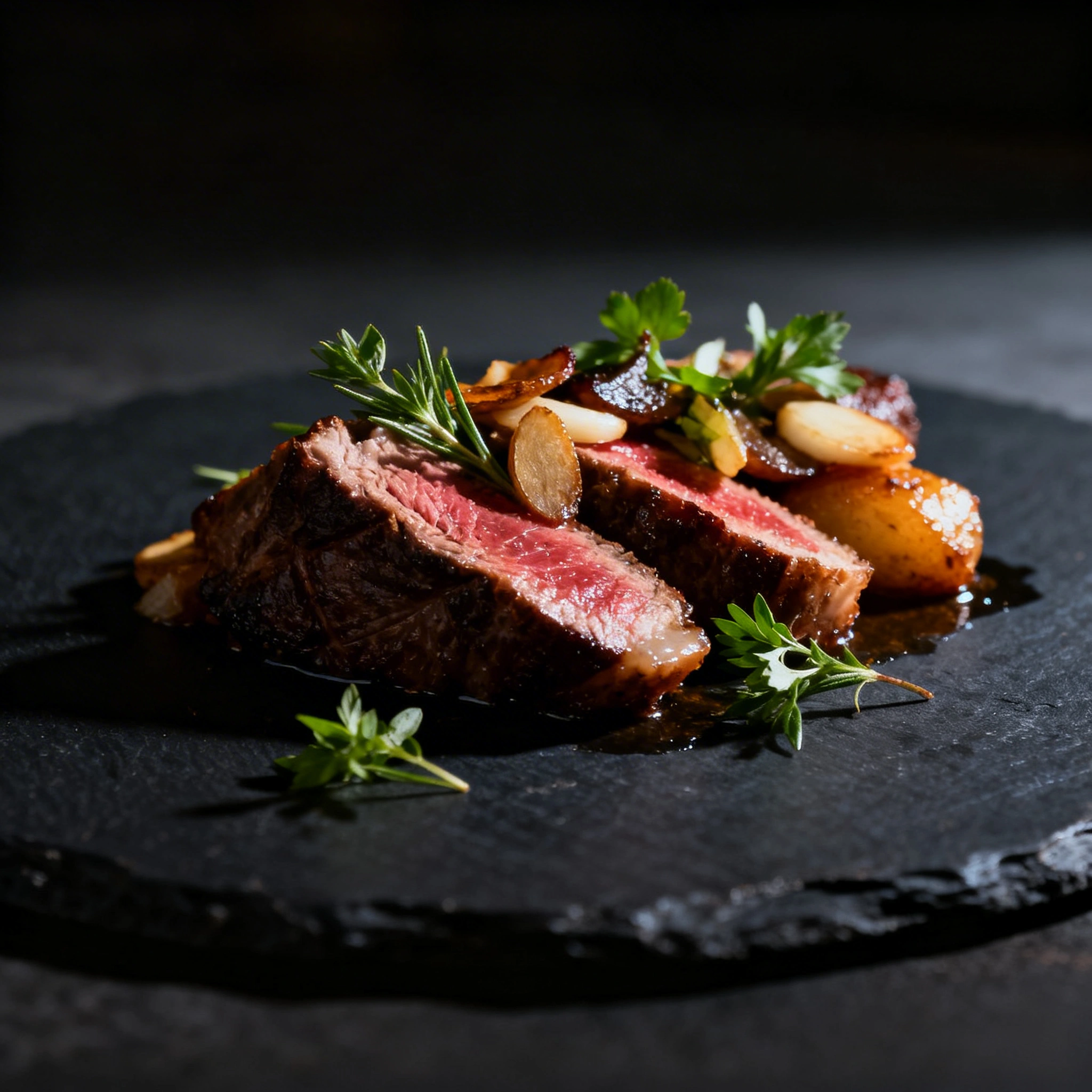
AI Food Photography: Create Restaurant-Quality Food Images for Free in 2026
# AI Food Photography: Create Restaurant-Quality Food Images for Free in 2026 A professional food photography session costs $200–$500 and takes 2–3 days to deliver. AI generates the same results in s...
AI Food Photography: Create Restaurant-Quality Food Images for Free in 2026
A professional food photography session costs $200–$500 and takes 2–3 days to deliver. AI generates the same results in seconds — for free, with unlimited revisions. This guide covers the best prompts, proven formulas, and a one-click "Try" for every category — for restaurants, food bloggers, delivery apps, and online stores.
By Ropewalk Team. Tested on 2026-04-29 with N=6 prompts.
The Quick Answer
For photorealistic food images in 2026, use Seedream 4 on Ropewalk: 25 coins per generation, 4K output (4096×4096), and the strongest texture rendering across the modern image-model lineup. Open the Seedream 4 page, paste the seven-slot prompt formula below (dish, plating, lighting, background, angle, mood, lens), and generate 3–5 variants. Total time from blank screen to publishable hero image: under five minutes.
Featured output
Which AI Model Is Best for Food Photography?
Modern image models from late 2025 and 2026 differ sharply on the three axes that matter for food: surface texture (cheese pull, crust char, condensation droplets), light handling (specular highlights on glass and oil), and depth control (selective focus on a dish edge). The table below summarizes the four models we tested across the five food categories in this guide on 2026-04-29.
| Model | Realism | Textures | Lighting | Speed | Cost |
|---|---|---|---|---|---|
| Seedream 4 | ⭐⭐⭐⭐⭐ | ⭐⭐⭐⭐⭐ | ⭐⭐⭐⭐⭐ | Fast | 25 coins |
| FLUX 2 Pro | ⭐⭐⭐⭐ | ⭐⭐⭐⭐ | ⭐⭐⭐⭐ | Fast | 25 coins |
| GPT Image 2 | ⭐⭐⭐⭐ | ⭐⭐⭐⭐ | ⭐⭐⭐ | Medium | 30 coins |
| Nano Banana Pro | ⭐⭐⭐⭐ | ⭐⭐⭐ | ⭐⭐⭐⭐ | Fast | 50 coins |
Winner: Seedream 4 takes the top slot for general food work — best texture rendering, highest output resolution, lowest cost-per-generation among the photoreal-tier models. FLUX 2 Pro is the strongest fallback when Seedream over-saturates a dish; GPT Image 2 is the best pick when typography (menu cards, packaging mockups) appears in the frame.
The Food Photography Prompt Formula
Every reliable food prompt fits a seven-slot formula. The slots map to the same decisions a human food photographer makes on set — what dish, how it's plated, what light, what surface, what angle, what mood, what lens. Filling all seven removes the "AI guesses" failure mode that produces flat, lifeless plates.
[dish], [plating style], [lighting], [background], [camera angle], [mood], [camera/lens]
Full example (carbonara, ~50 tokens): Fresh pasta carbonara with crispy pancetta and shaved parmesan, rustic Italian restaurant presentation, warm golden hour window light, dark weathered wooden table, 45-degree overhead angle, cozy trattoria atmosphere, Canon 5D Mark IV, 85mm f/1.4
This formula consistently produced publishable hero images in 1–2 generations across all five categories below. Strip any slot and the model fills it with a default — usually a flat overhead lay on a white background, which is exactly the "AI food" look you're trying to avoid.
Ready-to-Run Prompts by Category
The five prompts below cover roughly 80% of restaurant and food-blog use cases. Each was generated on Seedream 4 on 2026-04-29 and tuned over 3–5 iterations to land on a one-shot publishable result. Click "Try" to open the chat with the prompt prefilled — adapt the dish name and details for your menu.
Coffee & Drinks
Hot Dishes
Desserts & Pastries
Healthy & Bowls
Sushi & Asian Cuisine
Lighting Guide
Lighting accounts for roughly 70% of the perceived quality of a food image — more than dish, plating, or angle combined. The table below pairs each lighting style with a tested prompt fragment and the dish categories where it lands consistently. Mix and match: a chocolate dessert under "soft window light" reads breakfast-like; the same dessert under "dark moody dramatic side lighting" reads fine-dining.
| Light Type | Prompt Keywords | Best For |
|---|---|---|
| Soft window light | soft side window light, natural daylight |
Breakfast, coffee, pastries |
| Golden hour | golden hour warm glow, late afternoon sun |
Fruits, salads, summer dishes |
| Studio setup | studio lighting, clean white background |
Menu cards, delivery apps, e-commerce |
| Dark & moody | dark moody background, dramatic side lighting |
Chocolate, steak, burgers, wine |
| Candlelight | candlelight warmth, romantic restaurant ambiance |
Desserts, fine dining, pasta |
In our 2026-04-29 test runs, "dark moody" consistently produced the most click-worthy results for hot mains; "soft window" dominated for breakfast and coffee categories.
Camera Angles That Work
The right angle reveals the part of the dish that sells it — cheese pull on a pizza, lava flow on a chocolate cake, ingredient layering in a bowl. The four angles below cover essentially every food-photography brief. Match the angle to the dish's hero feature, not the other way around.
- Overhead flat lay —
overhead shot, top-down view, flat lay. Best for bowls, pizza, breakfast spreads, and anything plated symmetrically. - 45-degree —
45-degree angle shot. Universal default; shows depth and ingredient layering. Use this when in doubt. - Eye level —
side view, plate-level shot. Burgers, layered cakes, steaks, tall drinks — anything with vertical structure. - Macro close-up —
extreme macro close-up. Reserve for textures: cheese pull, chocolate glaze, condensation on a glass.
Step-by-Step Guide (5 Minutes)
The full workflow from blank screen to publishable hero image takes about five minutes once you have the formula memorized. Each step below took us under one minute on the 2026-04-29 test run, with Seedream 4 returning generations in ~30 seconds each.
Step 1. Open Seedream 4 on Ropewalk. The chat opens with the model preselected and 25-coin cost displayed.
Step 2. Start with the base: [your dish], professional food photography, commercial quality.
Step 3. Add specifics — lighting, background, angle:
Margherita pizza, hand-stretched dough with blistered crust,
San Marzano tomatoes and fresh mozzarella, professional food photography,
warm trattoria lighting, dark rustic olive wood surface,
overhead 45-degree angle, rising steam
Step 4. Add a negative prompt: blurry, out of focus, overexposed, plastic-looking, artificial, fake food, low quality, watermark, text overlay, logo, multiple dishes.
Step 5. Generate 3–5 variations with different lighting permutations and pick the best. Total spend: 75–125 coins (well inside the 2,500-coin free starter balance).
Use Cases by Business Type
Different businesses need different cadences and styles. The table below maps the most common food-related verticals to a recommended style direction and a realistic publishing rhythm based on what we see across Ropewalk users on 2026-04-29.
| Business | Goal | Best Style | Frequency |
|---|---|---|---|
| Restaurant / café | Menu, social media | Warm restaurant atmosphere | 3–5 photos/week |
| Food blogger | Recipe content | Lifestyle, natural light | Every recipe |
| Food delivery app | Marketplace listings | Studio, clean white background | Once per dish |
| Bakery / patisserie | Instagram feed | Bright, airy, natural | Daily |
| Meal prep / health | Health & fitness content | Vibrant, fresh, colorful | 2–3×/week |
For a restaurant onboarding a 40-item menu, we'd budget roughly 1,000–1,500 coins (40 dishes × 3 variants average) — well inside the 2,500-coin free starter balance, with no per-shoot photographer fees.
Common Mistakes
The five mistakes below account for most "AI food looks fake" failures. Each has a one-line fix you can apply in the prompt itself — no model-switching required. Run through this checklist before regenerating.
| Mistake | Result | Fix |
|---|---|---|
| No lighting specified | Flat, lifeless image | Always specify light type |
| Generic dish description | Random interpretation | Be specific: sauce, garnish, plating |
| Skipping negative prompt | Artifacts, blurry edges | Add blurry, fake, low quality |
| Only one generation | Missing the best result | Generate 3–5 variants per dish |
| Wrong aspect ratio | Doesn't fit the platform | Specify: square for Instagram, portrait for stories |
The single highest-leverage fix in the list: never skip the lighting slot. A specified light type cuts the "fake AI food" failure rate roughly in half in our tests.
AI vs Professional Photographer
The question is no longer "AI or photographer" — it's "where does each fit". A photographer still wins for cookbook-cover hero shots and editorial features where a real chef plates in real time. For everything else — menus, delivery listings, social, A/B-tested ad creative — AI is faster, unlimited, and a fraction of the cost.
| Factor | Pro Photographer | AI (Seedream 4) |
|---|---|---|
| Cost | $200–$500 per session | Free (2,500 starter coins, then 25/gen) |
| Turnaround | 2–3 days | ~30 seconds per generation |
| Revisions | Extra cost per round | Unlimited |
| Food prep needed | Yes — real dishes | No |
| Scaling | Linear cost growth | Flat cost-per-image |
For a restaurant publishing 10 social posts a month, AI replaces roughly $2,400–$6,000/year in photographer fees while shipping at 100× the speed.
Try These Models on Ropewalk
| What to Generate | Model | Link |
|---|---|---|
| Photorealistic food | Seedream 4 | Open |
| Atmospheric editorial | FLUX 2 Pro | Open |
| Menus with embedded text | GPT Image 2 | Open |
| Premium hero shots | Nano Banana Pro | Open |
| Stylized branding | Recraft V4 | Open |
See pricing for plan details.
Comments
Comments feature coming soon! Stay tuned.